Guide
ComfyUI
AI Video Generation
GPU Cloud
Share
Generate cinematic AI videos from text or images — step by step, with screenshots.
By Pek Pongpaet · Impekable · Updated May 2026 · 15 min read
What's in This Guide
1. Introduction - Why WAN 2.2 + RunPod?
2. Definition of Terms
3. WAN 2.2 Model Variants & GPU Requirements
4. Part 1 - Deploying the Pod (Steps 1–6)
5. Part 2 - Loading the Workflow (Steps 7–8)
6. Part 3 - Configuring the Workflow (Steps 9–12)
7. Part 4 - Generating Video (Steps 13–14)
8. Quick Reference Settings Table
9. Pro Tips & Common Mistakes
10. WAN 2.2 vs. Alternatives
11. Official Resources & Links
12. Call to Action
13. FAQ (8 questions)
Introduction: Why Run WAN 2.2 on RunPod?
AI video generation has had a breakout year. But for most creators, the biggest barrier isn't the software, it's the hardware. Running WAN 2.2, Alibaba's state-of-the-art open-source video model, demands at least 48 GB of GPU VRAM. That's data-center-grade hardware most people will never own.
RunPod solves this. Instead of a $10,000+ workstation, you rent an enterprise GPU for a few dollars per hour spin it up, generate your video, and shut it down. No ongoing cost, no hardware maintenance, no compromise on quality.
WAN 2.2 (released July 28, 2025) uses a Mixture-of-Experts (MoE) architecture to deliver cinematic-quality video at 720p/24fps. It's free to use (Apache 2.0 license), integrates with ComfyUI, and on benchmarks it matches or beats several leading commercial tools. This guide walks you through every step, screenshots included.
WAN 2.2 Model Variants & GPU Requirements
T2V-A14B | Text → Video | 24 GB+ | Cinematic text prompts |
I2V-A14B | Image → Video | 24 GB+ | Animating photos/illustrations |
|
|
|
|
RTX 4090 / A5000 | 24 GB | TI2V-5B @ 720p | ~$0.60–0.80 |
A100 (40 GB) | 40 GB | 14B @ 480p | ~$1.50–2.00 |
|
|
|
|
■ Cost tip: A 5-second video on an H100 takes ~3–8 min, costing roughly $0.25–$0.60/clip. Always stop your pod when not generating.
Part 1 - Deploying the Pod
1.Navigate to RunPod
Click the link in the video description to go directly to the RunPod deploy screen.
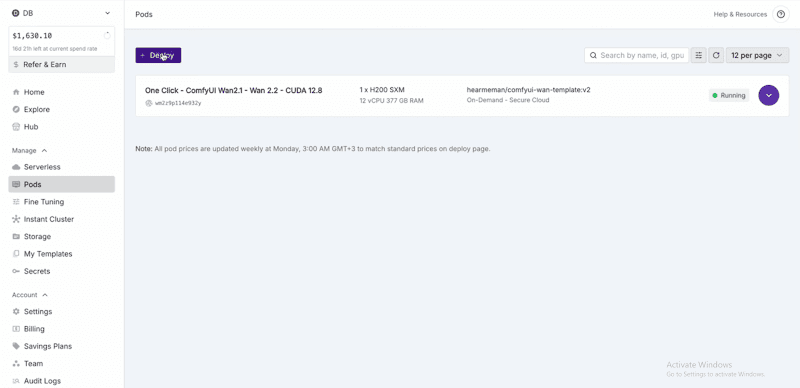
2.Select your GPU
Choose a GPU with at least 48 GB VRAM. The H100 is recommended for best quality. Any GPU meeting the VRAM requirement will work, choose what fits your budget.

3.Open the template editor
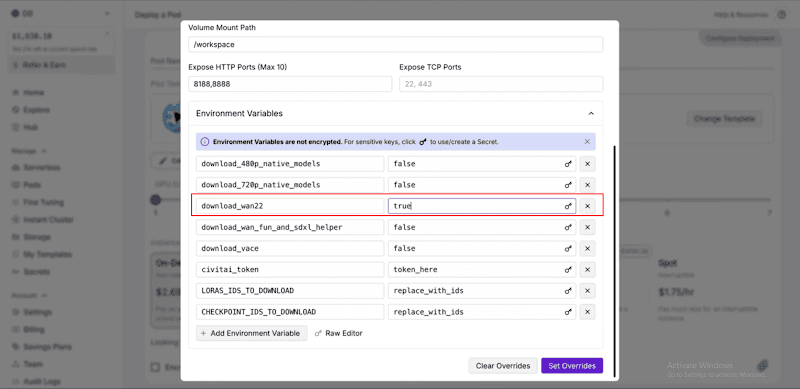
Before deploying, click Edit Template and expand the Environment Variables tab.


4.Set the download flag
Find the environment variable download_WAN_2.2, set its value to true, then click Set Overrides.
⚠ Required:
This environment variable must be set to true before deploying. If skipped, the Wan 2.2 model will not be downloaded and the workflow will not function.
5.Deploy the pod
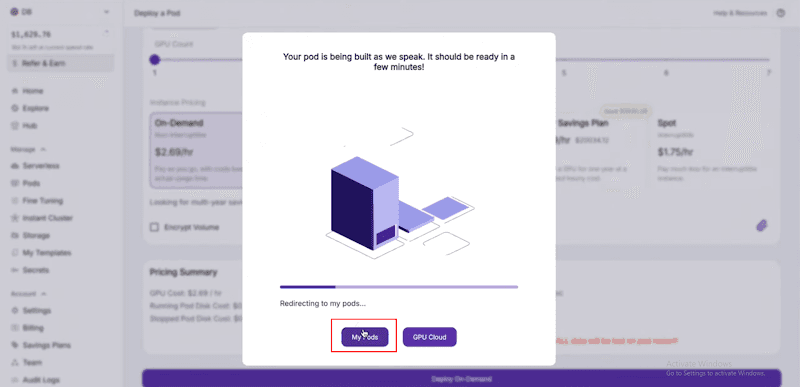
Scroll to the bottom of the deploy screen and click Deploy On Demand. Then navigate to My Pods.

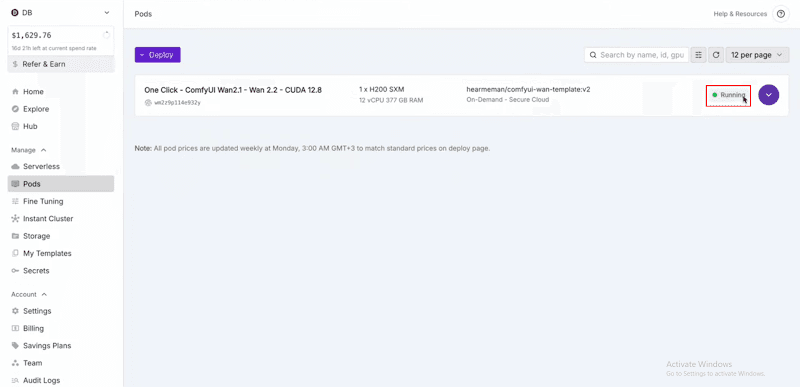
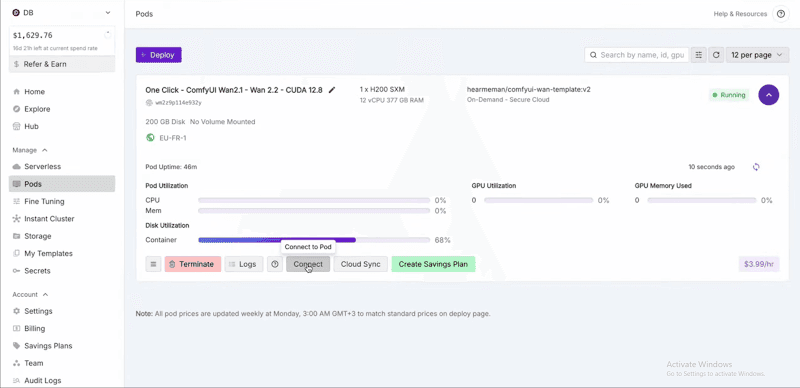
6.Wait for the pod to be ready
Expand the pod logs. Wait until you see the message "config is up".
Once ready, click Connect → Connect to ComfyUI.



Part 2 - Loading the Workflow
7.Close the promotional screen
When ComfyUI first loads, you may see a promotional overlay. Click the X in the top right corner to dismiss it.
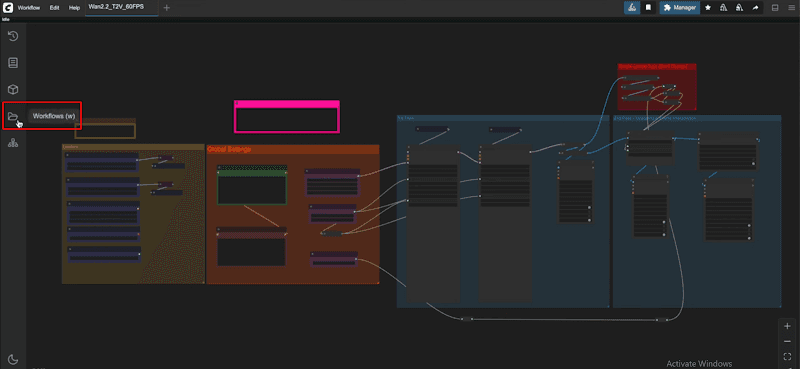
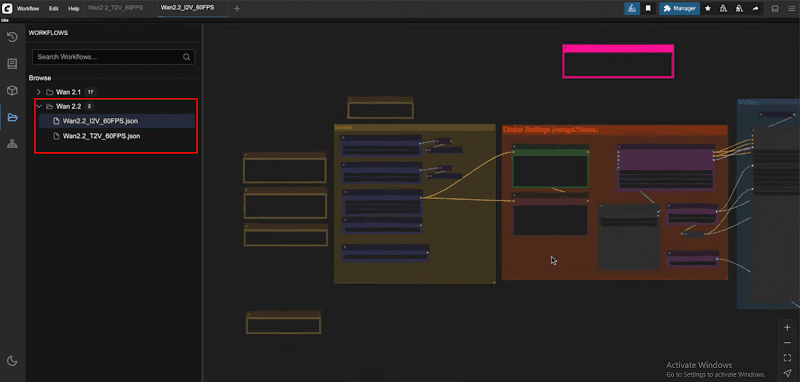
8.Open the Workflows folder
Click the folder icon in the left sidebar to open the Workflows panel.
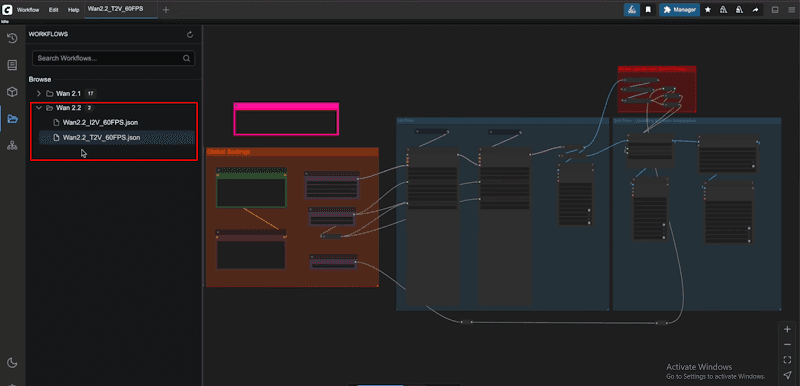
9.Select the Wan 2.2 workflow
Inside the Workflows folder, open the Wan 2.2 subfolder. Choose either text_to_video or image_to_video - both work identically except for the input source.
ℹ Note:
Workflows are linear and read left to right. If you have used previous Wan workflows, the layout will look familiar.

Part 3 - Configuring the Workflow
10.Verify models on the left side
Confirm that your CLIP, VAE, and Upscaler models are loaded correctly in the leftmost nodes.
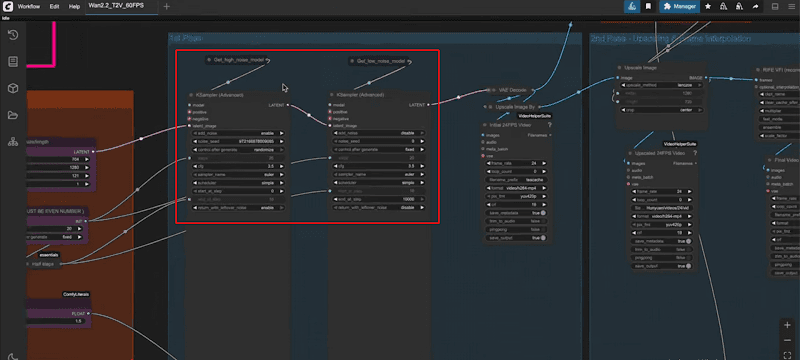
11.Understand the dual-model architecture
Wan 2.2 uses two diffusion models: a high noise model and a low noise model. The high noise model must be used in Sampler 1 and the low noise model in Sampler 2. Do not swap them.
⚠ Critical:
The high noise model must always be assigned to the first sampler and the low noise model to the second. Swapping them will produce poor results.
12.Enter your prompts
Type your text prompt and negative prompt in the designated fields on the right side of the workflow.
13.Set video resolution and frame count
Select your desired resolution. For a 5-second video, use 121 frames (Wan 2.2 samples at 24 fps).
Model | Sample Rate | 5-Second Video | Output FPS |
|---|---|---|---|
Wan 2.1 | 16 fps | 81 frames | 60 fps (interpolated) |
Wan 2.2 | 24 fps | 121 frames | 60 fps (interpolated) |
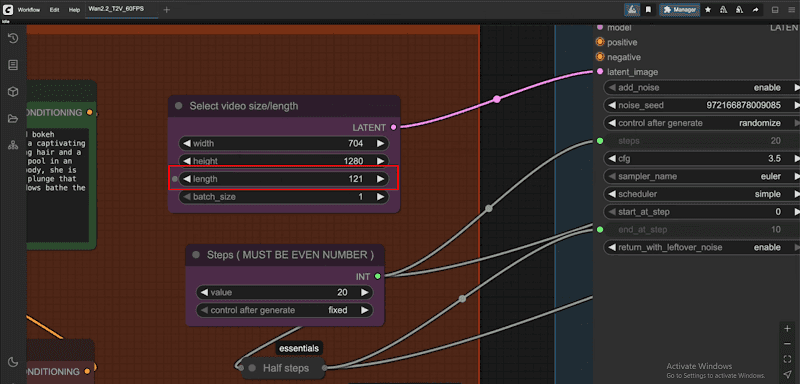
14.Set the number of steps
Enter a step count. This value must be an even number because the steps are divided equally between the two samplers.

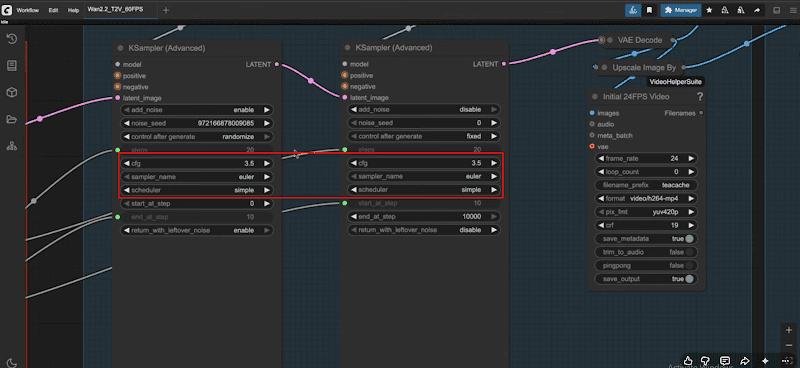
15.Configure sampler settings
Recommended starting values: CFG 3.5, Euler sampler, Simple scheduler. Apply the same settings to both samplers.
ℹ Note:
Best sampler settings for anime or realistic styles are still being explored by the community. Check the creator's Discord server for updated recommendations.
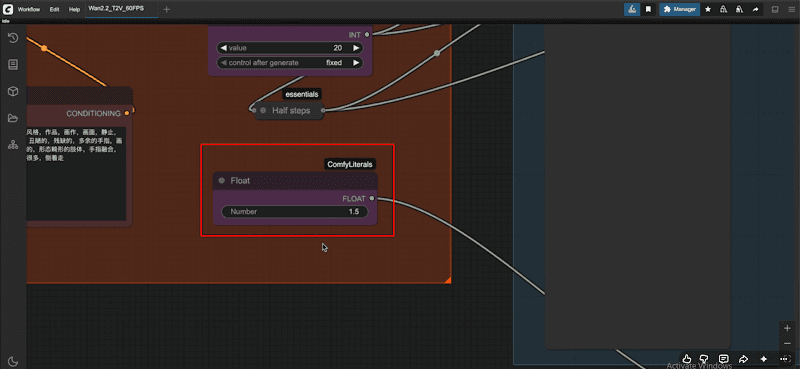
16.Leave upscale factor at default
Do not change the upscale factor setting. The quality improvement is negligible but the generation time increases significantly.
Part 4 - Generating Video
17.Queue the generation
Once all settings are configured, queue the workflow. The final nodes will automatically upscale and frame-interpolate the output to 60 fps.

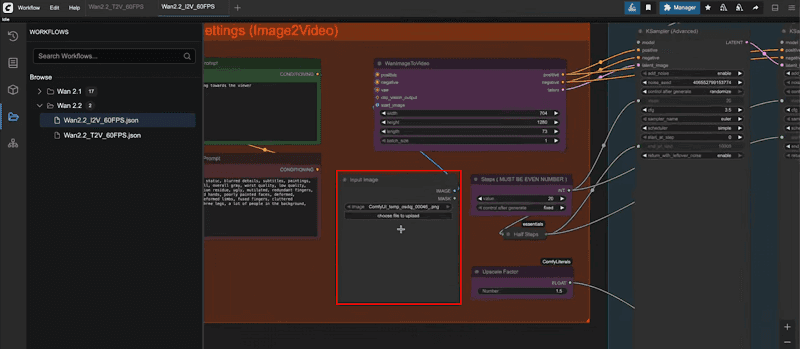
18.Image-to-video workflow
The image-to-video workflow is identical to text-to-video with one difference: you must load a source image in the input node on the left side before queuing.
Quick Reference
Setting | Recommended Value |
|---|---|
GPU | H100 (or any GPU with 48+ GB VRAM) |
Env Variable | download_WAN_2.2 = true |
Frames for 5 seconds | 121 frames at 24 fps |
Steps | Even number (split between 2 samplers) |
CFG | 3.5 |
Sampler | Euler |
Scheduler | Simple |
Upscale Factor | Default (do not change) |
Sampler 1 Model | High noise model |
Sampler 2 Model | Low noise model |
Definition of Terms
WAN 2.2
Open-source AI video generation model by Alibaba. Converts text or images into video clips at up to 720p/24fps. Apache 2.0 licensed, free for commercial use.
github.com/Wan-Video/Wan2.2
huggingface.co/Wan-A
RunPod
Cloud GPU marketplace, rent high-performance GPUs by the minute. No contracts, no setup headaches. Pay only while running.
runpod.io·
docs.runpod.io
ComfyUI
Free, open-source visual workflow tool for AI models. Connect blocks (nodes) in a canvas, no coding needed. github.com/comfyanonymous/ComfyUI
GPU / VRAM
GPU = the chip that powers AI generation. VRAM = its onboard memory. WAN 2.2's 14B models need 24–80 GB VRAM. The H100 on RunPod has 80 GB.
MoE (Mixture-of-Experts)
The architecture powering WAN 2.2. Two specialist 14B models share the work: one handles rough early generation (high noise), one refines detail (low noise).
Text-to-Video (T2V)
Describe a scene in words → AI generates a matching video clip.
Image-to-Video (I2V)
Provide a still image → AI animates it into a video sequence.
CFG (Classifier-Free Guidance)
Controls prompt adherence. Higher = closer to your words but may over-process. Recommended start: 3.5.
Network Volume
Persistent storage on RunPod. Keeps models and outputs safe after pod shutdown, essential for regular users.
Pro Tips & Common Mistakes
Tips for Better Results
Write descriptive prompts. Include camera angle, lighting, motion type, and mood. "A slow dolly push through a misty forest at dawn" beats "forest video."
Use a Network Volume. Without one, all models and outputs vanish when the pod stops. Essential for regular use.
Reduce frames before reducing resolution when hitting memory limits frame count multiplies VRAM usage faster than resolution.
Frame interpolation is automatic in the pre-built workflows the 2nd Pass section handles upscaling and RIFE VFI to 60fps.
Save your workflow JSON after dialing in settings. Re-import it to restore the exact config instantly.
Check the Discord community for updated CFG / sampler recommendations — especially for anime or photorealistic styles.
Common Mistakes to Avoid
• Not setting download_wan22 = true. Most common error pod launches but WAN 2.2 never downloads.
• Using an odd step count. Steps are split equally between two samplers. Odd number = unequal split = degraded quality.
• Swapping sampler models. High noise → Sampler 1. Low noise → Sampler 2. Period.
• Changing the upscale factor. Don't, the quality gain is negligible but generation time balloons.
• Terminating the pod without a Network Volume. All outputs are lost permanently. • Leaving the pod idle. You're charged while it's running. Stop it between sessions.
WAN 2.2 vs. Alternatives
WAN 2.2 | ■ Apache 2.0 | ■ Yes | 720p/24fps | ■ Yes |
|---|---|---|---|---|
Sora | ■ No | ■ Paid | 1080p | ■ No |
Runway Gen-3 | ■ No | ■ Paid | 1080p | ■ No |
Kling | ■ No | Limited | 1080p | ■ No |
WAN 2.1 | ■ Yes | ■ Yes | 720p/16fps | ■ Yes |
Official Resources & Links
WAN 2.2 - Official
GitHub - source code + model weights
github.com/Wan-Video/Wan2.2
Hugging Face - T2V-A14B
huggingface.co/Wan-AI/Wan2.2-T2V-A14B
Hugging Face - I2V-A14B
huggingface.co/Wan-AI/Wan2.2-I2V-A14B
Hugging Face - TI2V-5B (lightweight)
huggingface.co/Wan-AI/Wan2.2-TI2V-5B
Try online (no setup)
wan.video
RunPod - Official
Main site + GPU pricing
runpod.io
Documentation
docs.runpod.io
Pricing page
runpod.io/pricing
WAN 2.2 T2V serverless endpoint
console.runpod.io/hub/playground/video/wan-2-2-t2v-720-lora
WAN 2.2 I2V serverless endpoint
console.runpod.io/hub/playground/video/wan-2-2-i2v-720
ComfyUI + Community
ComfyUI GitHub
github.com/comfyanonymous/ComfyUI
ComfyUI Manager
github.com/ltdrdata/ComfyUI-Manager
Civitai — LoRAs & community models
civitai.com
RunPod Discord
discord.gg/runpod

Frequently Asked Questions
Do I need coding experience to use WAN 2.2 on RunPod?
No. ComfyUI is a visual, node-based interface. You connect pre-built blocks and type text prompts, no programming needed. This guide covers every step.
How much does it cost per video?
Can I run WAN 2.2 on my own computer?
What's new in WAN 2.2 vs. WAN 2.1?
Why must steps be an even number?
What happens if I forget to set download_wan22 = true?
Is WAN 2.2 free for commercial use?

© 2026 Impekable · impekable.com · Written by Pek Pongpaet, CEO
WAN 2.2 is open-source software by Alibaba (Apache 2.0). RunPod is an independent platform. Impekable is not affiliated with Alibaba or RunPod. Pricing estimates are approximate and subject to change, verify current GPU pricing at runpod.io/pricing.