AI
Guide
Design
Digital
Digital Transformation
Marketing
User Experience
Business Strategy
Technology Consulting
Enterprise Solutions
Share
What It Is, How It Works, and Why You Don't Need to Be a Designer to Use It
You've never opened Figma. You can't tell a serif from a sans-serif. But you have an idea, a product to pitch, or a landing page that needs to exist by Friday.
That's exactly who Claude Design was built for.
This Is for You If...
You're a founder, product manager, marketer, or student who needs to create visual work presentations, prototypes, one-pagers, landing pages without having a designer on speed dial. You don't need any prior design experience. You just need to be able to describe what you want.
Who Made Claude Design? A Quick Look at Anthropic
Anthropic PBC is an AI company headquartered in San Francisco. It was founded in 2021 by former OpenAI researchers, with a mission centered on safety-focused AI research and development, structured as a public benefit corporation (PBC).
The company was co-founded by siblings Dario Amodei and Daniela Amodei, with a clear goal: to develop safe, steerable AI systems that prioritize alignment with human values. Claude itself is named after Claude Shannon, widely regarded as the father of information theory.
About Claude Design
On April 17, 2026, Anthropic launched Claude Design, an AI-powered tool that turns text prompts into polished visuals. Designed for both designers and non-designers alike, it is powered by Claude Opus 4.7.
The tool targets designers, product managers, and marketers with AI-powered prototyping, slide decks, and marketing assets, positioning Anthropic as a challenger to Figma and Canva.
Claude Design is the first public product launched under Anthropic's new Labs incubation program, and it supports generating interactive prototypes, wireframes, and marketing visuals from natural language, uploaded documents, or linked repositories. Notably, Canva is a launch partner rather than a competitor users can natively export from Claude Design into Canva to finish assets.
Claude Design is accessible to users on Claude Pro, Max, Team, or Enterprise subscription plans.
Anthropic's Growth
Anthropic closed a $30 billion Series G in February 2026 at a $380 billion valuation, and more than doubled its revenue to a $9 billion annual run rate by the end of 2025.
Source: https://www.anthropic.com/
The History of Claude Design: How We Got Here
Date | Milestone | What it meant |
March 2023 | Claude 1.0 launches | Text-only chat, no visual or design capabilities |
June 2024 | Artifacts introduced | Claude generates interactive code & UI mockups directly in-chat |
Late 2025 | File creation + Skills added | Native Word, PowerPoint & Excel support; composable task-specific workflows |
Early 2026 | Proactive visual rendering | Claude generates UI components & diagrams without being asked |
April 16, 2026 | Claude Opus 4.7 released | Most capable vision model; Anthropic's CPO exits Figma's board same day |
April 17, 2026 | Claude Design launches | Research preview goes live, Figma stock drops 7% the same day |
Why This Exists Now
For years, the gap between "I have an idea" and "here's what it looks like" required either a skilled designer or hours of fighting with tools that weren't built for non-designers.
Canva helped. But Canva still assumes you have taste, templates, and time. Figma is powerful, but its learning curve is steep enough that entire certification programs exist around it.
Anthropic's pitch with Claude Design is simple: you shouldn't need to learn a design tool to produce design work. You should just need to know what you want.
Claude Design Features in 2026
Here's a full look at what the product currently offers:
Feature | What It Does | Best For |
Conversational prototyping | Describe what you want in plain text and Claude generates a working visual draft. No forms, no templates. | Anyone starting from zero |
Automatic design system generation | During onboarding, Claude reads your codebase, Figma files, font folders, and GitHub repos to extract your brand colors, typography, and components. Every project after that inherits them automatically. | Teams who need consistent brand output |
Four input methods | Start from a text prompt, upload reference images or sketches, drop in a DOCX/PPTX/XLSX, or use the web capture tool to pull elements from a live website. | Any workflow or starting point |
Inline commenting | Click any element in the design and leave a comment. Claude adjusts that specific part without touching the rest. | Precise edits without re-prompting |
Direct text editing | Fix a typo or update a label directly in the canvas. No need to describe the change in chat. | Quick copy fixes |
Adjustment knobs | Claude generates custom sliders for spacing, color, and layout. Drag them live to see changes in real time, then apply your preferred setting across the whole design. | Fine-tuning layout and style |
Interactive prototypes | Generates code-powered prototypes you can click through, including builds with voice, video, shaders, and 3D elements. Not just static images. | User testing and demos |
Organization-scoped collaboration | Keep designs private, share view-only by link, or open for full editing so teammates can modify and chat with Claude in the same session. | Team design reviews |
Export to multiple formats | Save as a folder, export to PDF, PPTX, or standalone HTML, or push directly to Canva. | Sharing and publishing finished work |
Claude Code handoff | When a design is ready to build, Claude packages everything into a handoff bundle: a single instruction passed to Claude Code for implementation. | Getting designs into production |
Multi-design-system support | Teams can maintain more than one design system. Useful for organizations managing multiple brands or product lines. | Agencies and multi-brand companies |
Enterprise admin controls | Admins can enable or restrict Claude Design access org-wide and control which design systems are published and visible to the team. | IT and compliance teams |
Pricing: What Does Claude Design Cost?
Claude Design is not sold separately. It's bundled into existing Claude paid plans. Here's how the pricing breaks down as of May 2026:
Plan | Price | Claude Design Access | Usage Level | Best For |
Free | $0/month | ❌ Not included | — | Casual Claude chat only |
Pro | $20/month ($17/month annual) | ✅ Included | Small weekly budget. Most users hit the limit after 3–4 design prompts. | Occasional use or first-time testing |
Max 5x | $100/month | ✅ Included | 5x more usage than Pro. Priority access to new features and models. | Individuals who design regularly |
Max 20x | $200/month | ✅ Included | 20x more usage than Pro. | Power users for whom design is a daily workflow |
Team Standard | $25/seat/month ($20 annual) | ✅ Included | More usage than Pro. Includes M365, Slack, SSO, admin controls. Min. 5 seats. | Non-developer teams collaborating on design |
Team Premium | $100/seat/month ($125 monthly) | ✅ Included | 5x more usage than Standard. Adds Claude Code and Cowork. Mix-and-match with Standard seats. | Teams with both designers and developers |
Enterprise | Custom ($20/seat base + usage) | ✅ Off by default, admin must enable | Usage scales with the organization. Adds SCIM, audit logs, compliance API, HIPAA readiness, IP allowlisting. | Companies with strict compliance or governance needs |
The honest note on Pro: Most reviewers recommend at least Max 5x for anyone who plans to use Claude Design more than a few times per week. Pro's weekly token budget runs out quickly, and Claude Design's visual generation is token-heavy compared to regular chat.
There's no separate Claude Design subscription line. What you pay for Claude is what you pay for Claude Design.
If You're Ready to Try It: Start Here
Go to claude.ai/design right now and type this exact prompt:
"Create a simple one-page website for a local coffee shop. Clean layout, warm earthy tones, include a menu section, an about section, and a contact form."
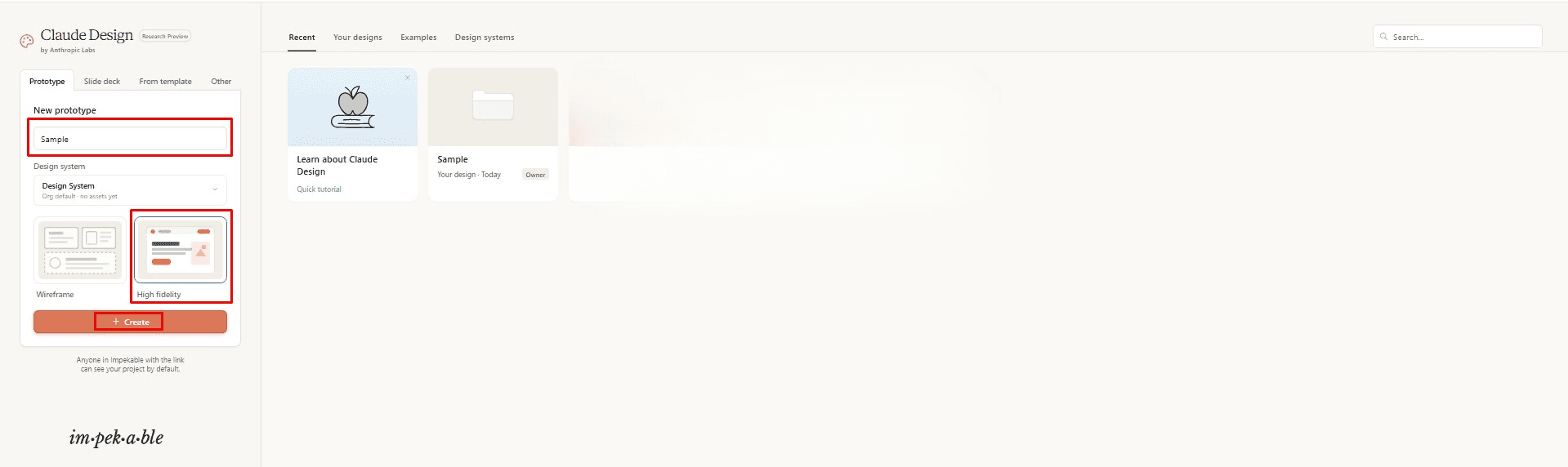
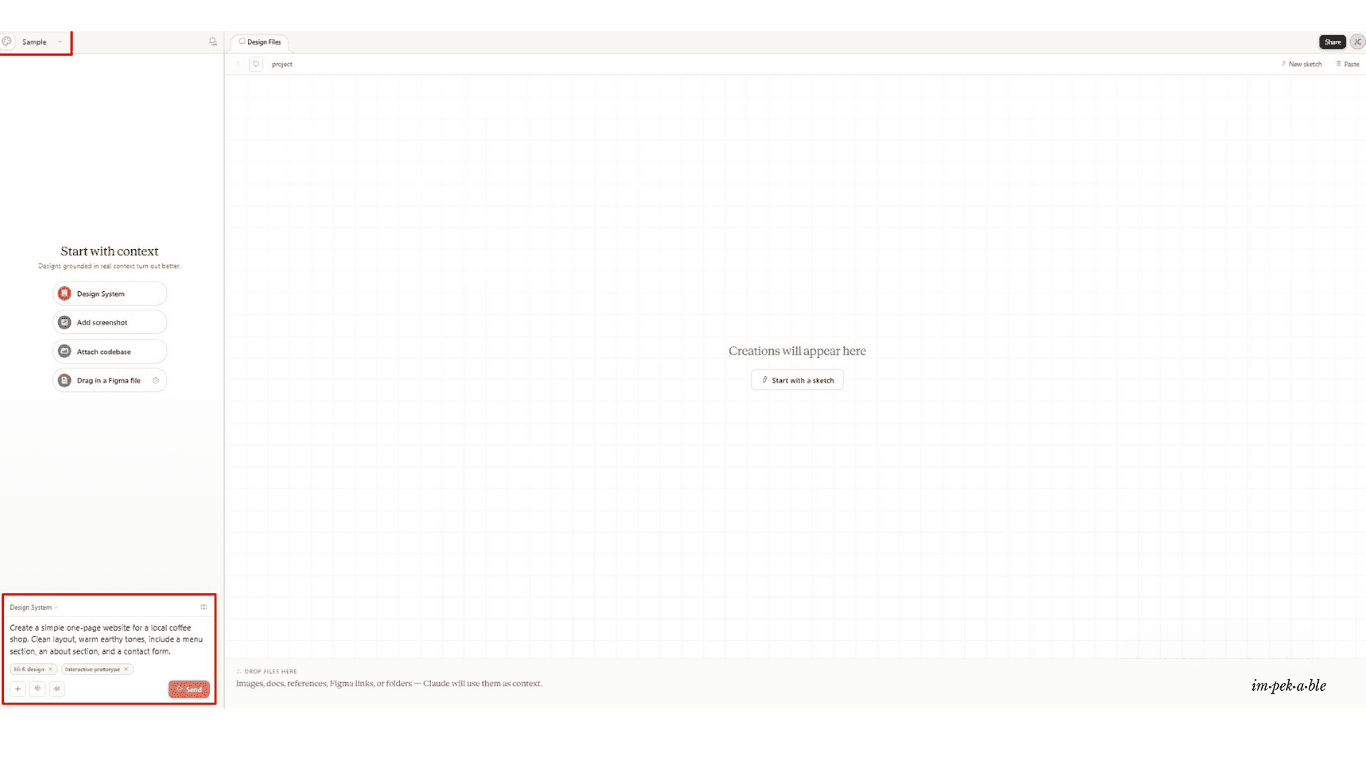
You'll have a first draft in under 60 seconds. You don't need to set up a design system first. You don't need to upload anything. Just describe and go.
From there, tell Claude what to change. Be specific. "Make the hero section darker." "Move the menu above the about section." "Change the font to something less formal." You're not clicking through menus. You're having a conversation.
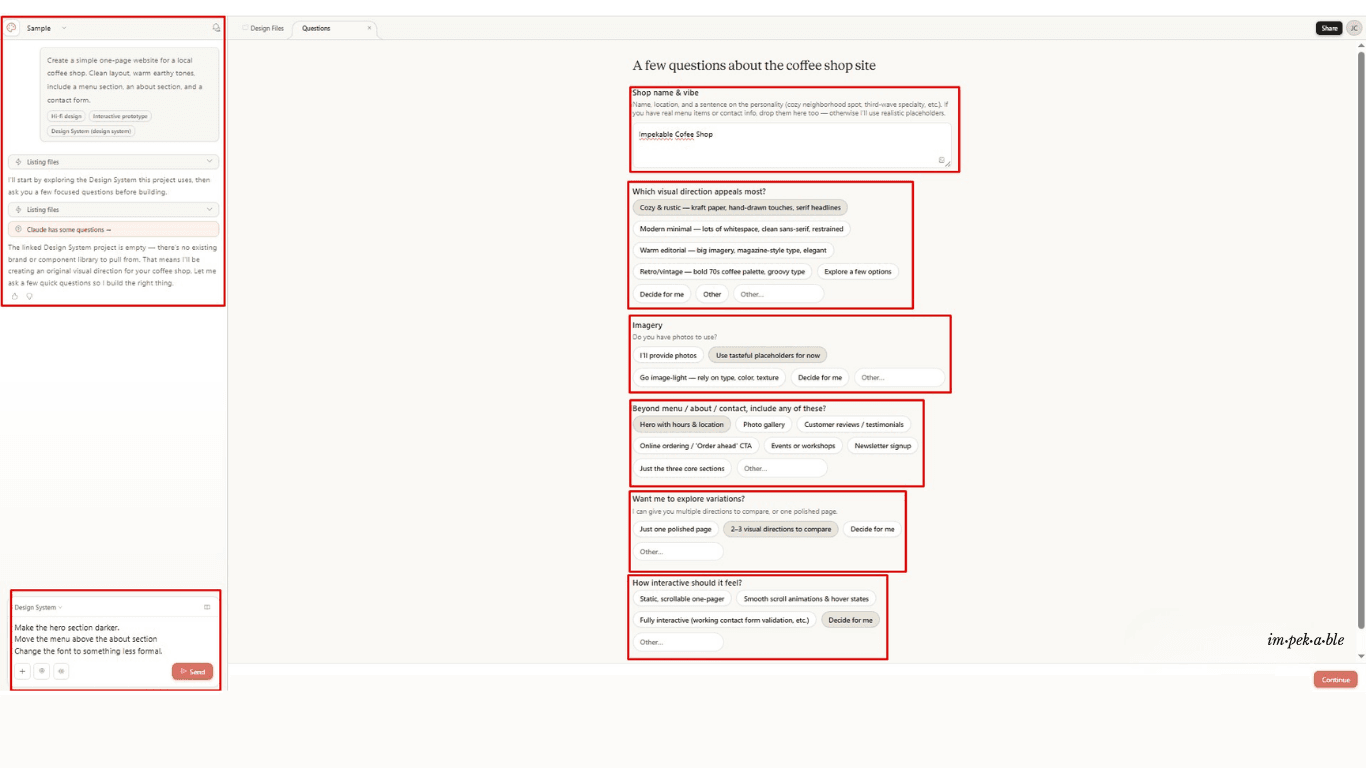
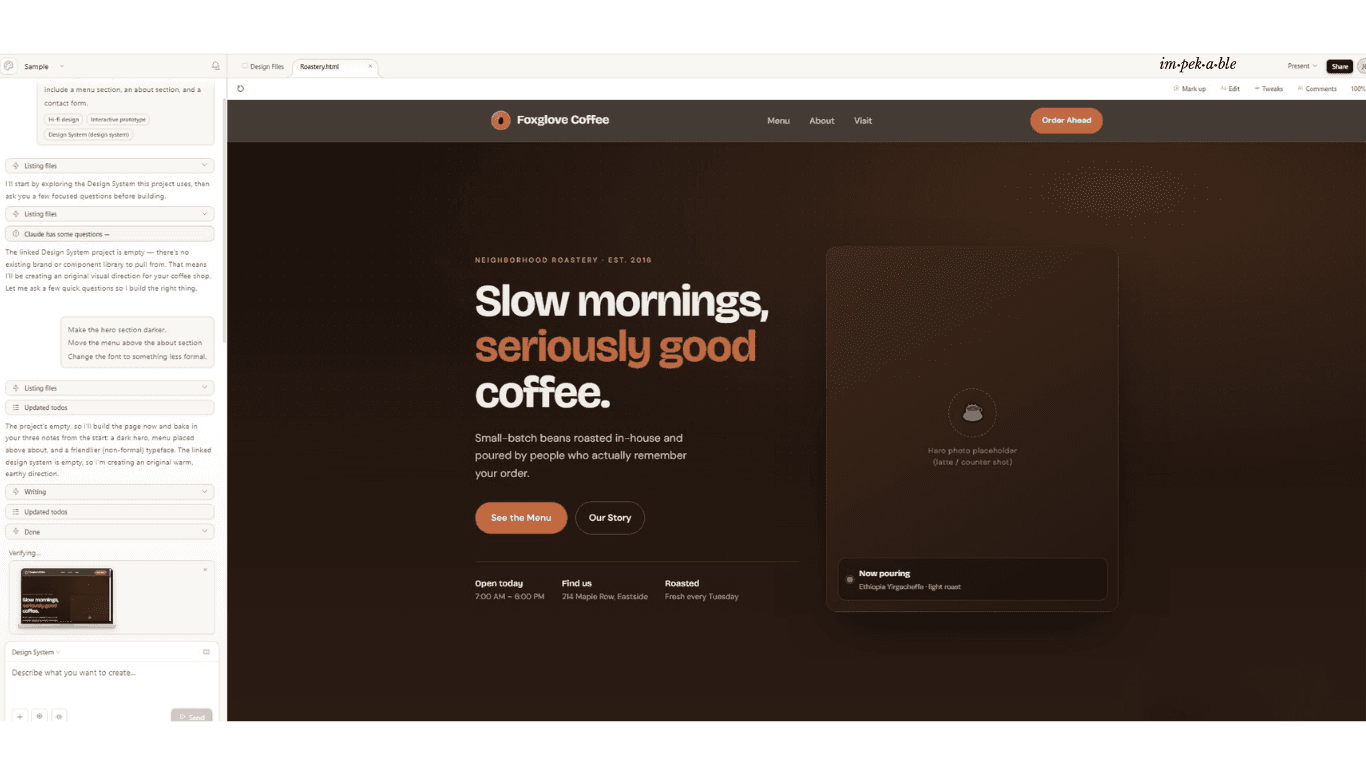
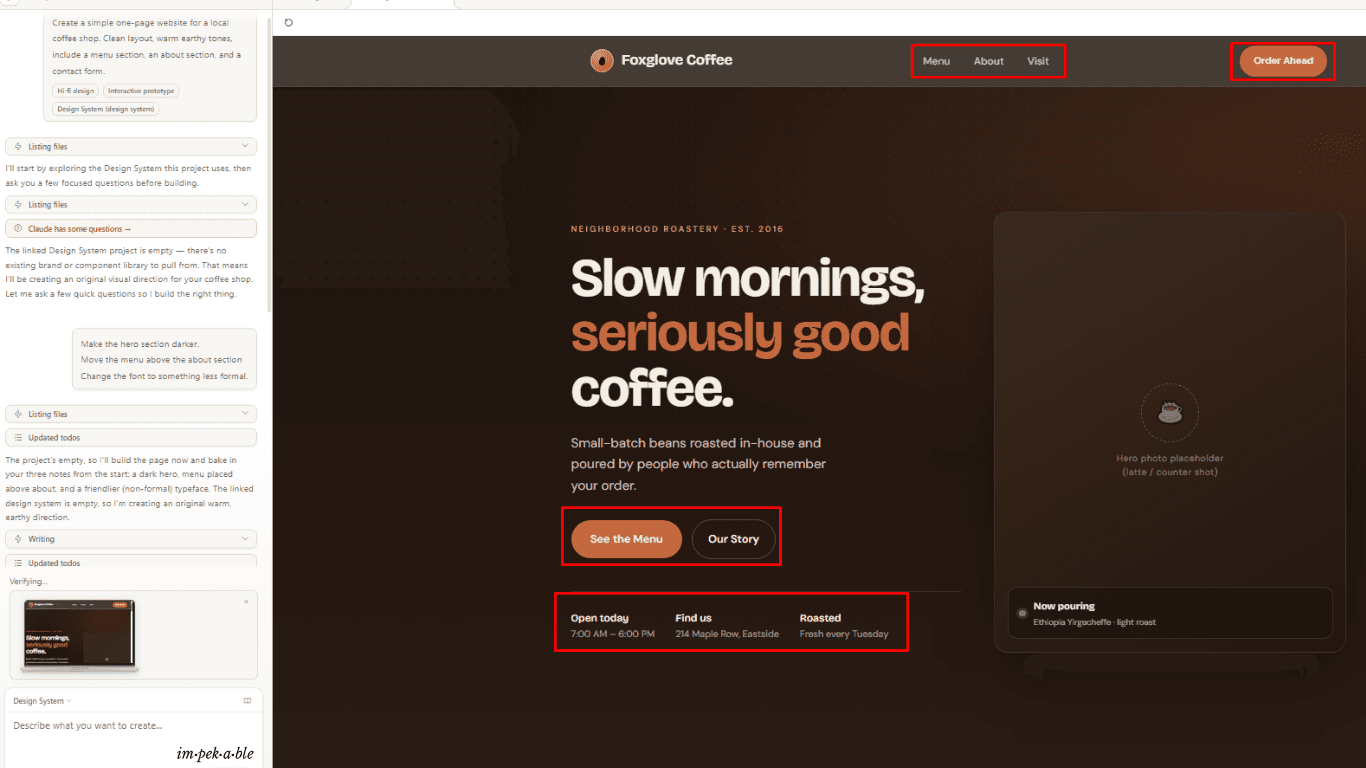
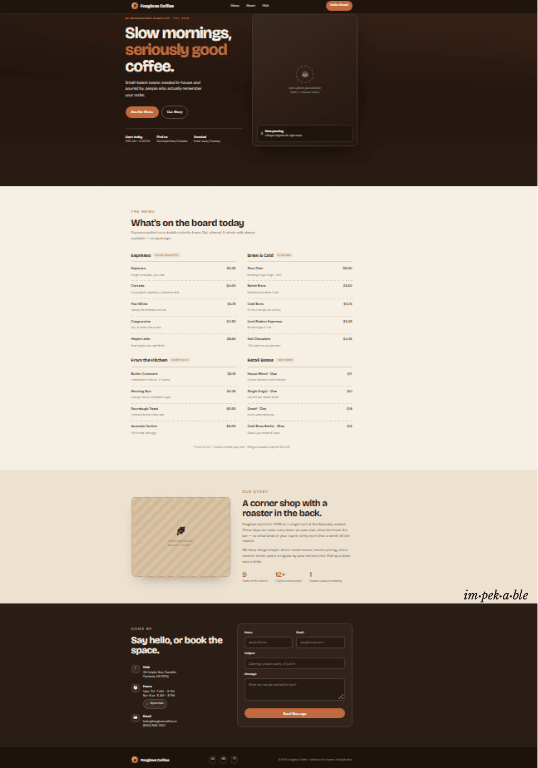
That's the whole point.
But if you want someone to walk you through it hands-on, or apply it directly to your business, that's where Impekable comes in.
The Core Idea: Design Systems Before You Start
Here's what separates Claude Design from just asking Claude to "make me something that looks nice."
When you first set up Claude Design, it builds a design system for you. This is the behind-the-scenes logic that makes all your outputs feel consistent: your brand colors, your preferred fonts, the kind of button shapes and card layouts that match your product.
Claude builds that system by reading whatever you give it: a codebase, a slide deck, a PDF, even a well-designed PowerPoint. It extracts your visual identity and stores it. From that point on, every project you create uses that system automatically.
You never start from scratch again. You start from your brand.
For individuals without an existing brand, Claude generates a sensible default and lets you adjust it over time. You're not locked in.
What You Can Actually Build
Claude Design is not a single-use tool. Teams have been using it for:
Realistic, shareable prototypes. Turn a static mockup into something you can click through, without writing a single line of code or waiting on a PR review.
Product wireframes. Sketch a feature flow, share it with your engineering team, and hand it directly to Claude Code for implementation.
Pitch decks and presentations. Go from a bullet-pointed outline to a complete, on-brand deck in one conversation. Export it as a PPTX or send it straight to Canva for final polish.
Marketing assets. Landing pages, social media visuals, campaign one-pagers. Create them fast and loop in a real designer to refine later.
Advanced interactive prototypes. If you're technical, Claude Design can build code-powered prototypes with voice, video, 3D, and built-in AI capabilities.
Refining What Claude Builds
The first output is a starting point, not the final answer.
After Claude generates something, you have several ways to refine it:
Comment inline. Click directly on an element and leave a note, like you would in a Google Doc. Claude adjusts that specific part.
Edit text directly. No need to re-prompt for a typo or label change.
Use adjustment knobs. Claude can generate custom sliders for spacing, color, and layout that you drag live to see the effect in real time.
Chat to apply changes globally. Ask Claude to "apply this new button style to every screen" and it will.
Olivia Xu, Senior Product Designer at Brilliant, noted that their most complex pages, which took 20+ prompts to recreate in other tools, only required 2 prompts in Claude Design. The jump from prototype to production was faster because design intent was already baked into the handoff.
Handing Off to Developers
When you're ready to build the real thing, Claude Design packages everything into a handoff bundle. It's a single instruction you pass to Claude Code, Anthropic's developer-facing coding tool.
That means there's a direct path from "idea" to "working prototype" to "production code" without losing context or spending hours translating design decisions into written specs.
Aneesh Kethini, Product Manager at Datadog, put it plainly: what used to take a week of back-and-forth between briefs, mockups, and review rounds now happens in a single conversation.
Collaboration and Sharing
Claude Design isn't just for solo work. Designs can be:
Kept private (just you)
Shared by link so anyone in your organization can view
Opened for editing so colleagues can modify and chat with Claude in the same session
For exports, you can save as a folder, export to PDF, PPTX, or standalone HTML, or push directly to Canva.
The Real Pros and Cons
What It Is | Why It Matters | |
✅ Speed | A first draft that used to take days exists in minutes. | You're not waiting on a designer, a freelancer, or a revision cycle. |
✅ Zero design knowledge needed | You don't need to know what a grid system is. Describe the outcome and Claude handles the execution. | Anyone on your team can produce visual work, not just the designer. |
✅ Brand consistency | Once your design system is set up, every output inherits your colors, fonts, and components automatically. | No more mismatched styles across decks, pages, and assets. |
✅ Iteration through conversation | Changing direction is as easy as typing "make it darker" or "try a two-column layout." | Exploring multiple directions takes minutes instead of days. |
✅ Direct path to code | The Claude Code handoff means design and development live in the same ecosystem. | No lost context between tools, no hours spent writing specs from scratch. |
⚠️ Research preview limitations | The product is still being refined. Some features behave inconsistently. | Expect occasional rough edges. This is not a polished v1.0 release yet. |
⚠️ Pro plan runs out fast | Pro's weekly token budget is small. Most users hit the limit after 3–4 design sessions. | Budget for Max 5x if design is a regular part of your work. |
⚠️ Not a Figma replacement | Designers who need pixel-perfect control, complex component libraries, and granular dev handoffs will still need Figma. | Claude Design is for everyone who was never going to use Figma in the first place. |
⚠️ Enterprise needs admin activation | Claude Design is off by default on Enterprise plans. | Your IT or admin team must enable it in Organization settings before anyone can access it. |
Step-by-Step: Getting Started as a Complete Beginner
Go to claude.ai/design. Make sure you're on a Pro, Max, Team, or Enterprise plan.
Complete the onboarding. Upload any brand assets you have. Even a logo and a color you like is enough to start.
Start with a simple text prompt. Something like: "Create a one-page website for a local bakery. Clean layout, warm colors, include a menu section and a contact form."
Review what Claude generates. Don't expect perfection. Expect a solid first draft you can react to.
Refine through conversation. Say what you'd change. Be specific. "The header font feels too heavy" is more useful than "I don't like the font."
Export or share. When it's close enough, export to PPTX, send to Canva, or share a link.
Frequently Asked Questions:
What is Claude Design and who is it for?
Do I need design experience to use Claude Design?
How much does Claude Design cost?
How is Claude Design different from Canva or Figma?
When was Claude Design launched?
Can I export what I create in Claude Design?
Is Claude Design available on the free plan?
The Bottom Line
Anthropic spent three years building toward this. Artifacts, file creation, visual rendering, design system ingestion, every feature was a piece of the foundation. Claude Design is what happens when all of it comes together.
The barrier to creating visual work just dropped significantly. You don't need Figma skills. You don't need a freelance designer on retainer. You need to know what you're trying to communicate and be willing to iterate.
If you've been putting off building that landing page, mocking up that product idea, or polishing that pitch deck because you "don't know design," that excuse is gone.
And if you want to skip the learning curve entirely and work with a team that's already on the other side of it, Impekable is ready.
We're an AI, design, and tech agency that has used Claude Design on real client projects, tested every feature hands-on, and built the workflows that turn a prompt into a production-ready deliverable. We don't just know the tool. We know how to make it work for your specific business.
Tell us what you're building. We'll show you exactly how we'd approach it.

References:
Anthropic. (2026, April 17). Introducing Claude Design by Anthropic Labs. https://www.anthropic.com/news/claude-design-anthropic-labs
Anthropic Support. (2026, April 17). Set up your design system in Claude Design. https://support.claude.com/en/articles/14604397-set-up-your-design-system-in-claude-design
Lardinois, F. (2026, April 17). Anthropic launches Claude Design, a Figma and Canva rival built on Claude. The New Stack. https://thenewstack.io/anthropic-claude-design-launch/
Lawson, L. (2026, April 21). Anthropic Labs launches Claude Design tool for visual prototyping. CMSWire. https://www.cmswire.com/digital-marketing/anthropic-labs-launches-claude-design-tool-for-visual-prototyping/
Brand Brain. (2026, May). Claude Design Pricing 2026: Plans, Costs & What You Actually Pay. https://www.brandbrain.app/blog/claude-design-pricing-for-marketers
Britannica Money. Anthropic | History, Controversies, & Claude AI. https://www.britannica.com/money/Anthropic-PBC
scriptbyai.com. (2026). Claude Timeline: From Claude 1 to Claude Opus 4.8. https://www.scriptbyai.com/anthropic-claude-timeline/